 |
Using the Conflict Manager |
When two people try to make a change to the same record at the same time this can cause a problem called a concurrency error. In such cases, it is difficult for a computer to know who's information should be saved and who's should be ignored. To help resolve such conflicts, OnTime's built in conflict manager can be used to view the differences and make an educated choice to fix the problem.
| In this article | |||
|
|||
If a conflict arises, the Conflict Manager window will appear asking you to make a decision to resolve the problem. The window will display two list boxes with corresponding values. This makes it easy to look through the list and see what the conflict is. The problem fields will always be highlighted in red text. The list on the left side shows the copy of data you have. The list on the right side shows the data for that same record that exists on the server.
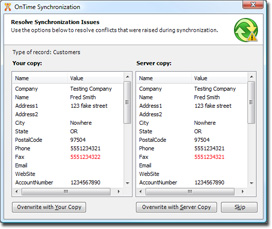
After comparing the data, you there are three choices for resolving the conflict: