View lists the way you want
Virtually every list of records throughout OnTime can be customized to fit your
preferences.
Show or hide columns
- Using the mouse, right click in the list that you want to customize and
choose Customize Current View. If this menu choice is not available,
then customization of that list is not available.
- A list of available columns will appear. Check the items that should be
visible. Uncheck the items that should be hidden.
- Click OK to save the changes.
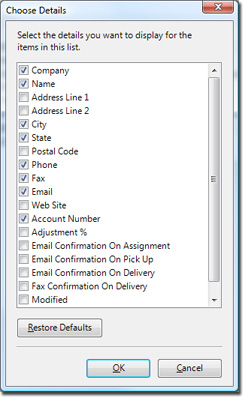
- Note: If you want to revert back to the factory settings, click the
Restore Defaults button.
Rearrange the order of columns
- Using the mouse, click on a column header and then drag it to the left
or right.
- A vertical line will appear indicating the position of the column in
relation to other columns.
- Release the mouse button when the column is positioned where you want.

